
✳ Quick answer
A catch-all (or accept-all) domain is a mail server set up to accept email for any address at that domain, real or not. Because it says "yes" to everything, a verifier cannot confirm whether a specific mailbox exists, so catch-all addresses are marked Risky rather than Valid. Keep the ones that have engaged recently, send valuable ones in a small separate batch, and suppress the rest.
Key takeaways
- A catch-all domain accepts mail for every address, so the server's answer can't prove a mailbox exists.
- Verifiers detect catch-all by testing a random, made-up address at the same domain.
- Catch-all is Risky, not Invalid. Many real business addresses sit on catch-all domains.
- Decide with engagement data: keep active contacts, test valuable ones in small batches, suppress the rest.
You run a list through an email verifier and a chunk of addresses come back neither Valid nor Invalid, but Catch-all, Accept-all or Unknown. On B2B lists this group can be large, and it is the part of verification people understand least. This guide explains what a catch-all domain is, why no tool can fully verify one, and how to decide which catch-all contacts to keep.
What is a catch-all email domain?
A catch-all domain (also called an accept-all domain) is a domain whose mail server is configured to accept email sent to any address at that domain, whether or not a mailbox with that name exists. Mail to anna@company.com, sales@company.com and asdfgh@company.com is all accepted, then either delivered to the right person or dropped into a shared "catch-all" inbox.
Companies switch this on so that nothing gets lost: a misspelled name, an old employee's address or a new alias still reaches someone. It is convenient for them, but it removes the one signal a verifier relies on.
Why verifiers can't confirm catch-all addresses
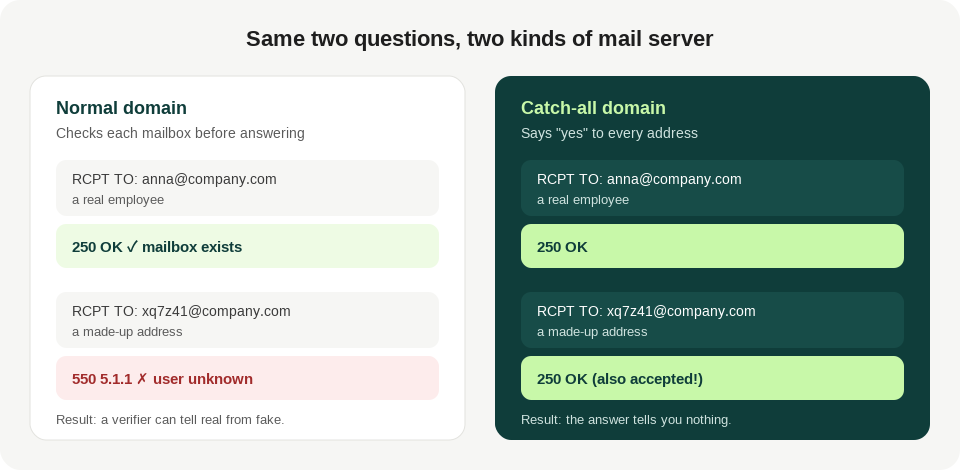
A full email check ends with an SMTP conversation. The verifier connects to the domain's mail server, says who the mail would be for (RCPT TO), and reads the reply, without ever sending a message. A normal server answers 250 OK for a real mailbox and 550 5.1.1 user unknown for a fake one. That difference is how a checker tells real addresses from dead ones.
A catch-all server answers 250 OK to both. The reply is the same for a real person and for an address that has never existed, so no tool can confirm the mailbox from the server's answer alone. Any service that claims to "verify" catch-all addresses with certainty is guessing from other signals, and the honest result is Risky.
How a verifier detects a catch-all domain
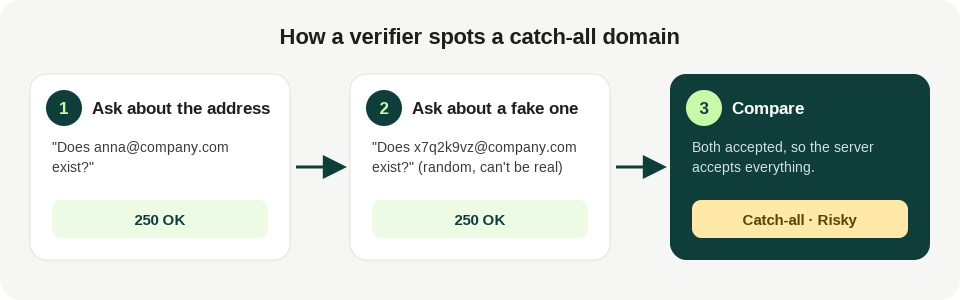
Detection itself is simple. After the real address is accepted, the verifier asks the same server about a random address that can't plausibly exist, like x7q2k9vz@company.com:
- If the random address is rejected, the server checks mailboxes, so the first
250 OKmeans the real address exists: Valid. - If the random address is also accepted, the server accepts everything: Catch-all, reported as Risky.
When a mailbox check runs on Email Verifier Tools, a catch-all address is labelled Risky with the note "Catch-all domain". If you see Domain OK instead, the format and mail server were checked but the mailbox wasn't, which is a different situation. You can try any address on the free email checker.
Catch-all vs. Valid vs. Invalid
| Result | What the server said | What it means | What to do |
|---|---|---|---|
| Valid | Accepts the address, rejects fake ones | The mailbox exists | Send |
| Catch-all / Risky | Accepts every address | Domain is real; mailbox unconfirmed | Decide using engagement (below) |
| Invalid | Rejects the address (5xx) | The mailbox doesn't exist | Remove |
| Unknown | No clear answer (timeout, greylisting) | Couldn't be checked right now | Re-check later |
Why catch-all addresses are risky
Catch-all addresses are not bad in themselves. Plenty belong to real, active people. The risk comes from what you can't see:
- Delayed bounces. Some catch-all servers accept the message first and send a bounce later, after checking internally. These still count against your bounce rate.
- Unread inboxes. Mail to a non-existent name may land in a shared box nobody reads. It doesn't bounce, but it never gets opened, and low engagement hurts your sender reputation over time.
- Spam traps. An address that accepts everything can hide old or recycled addresses used to catch senders with poor list hygiene.
Mailbox providers such as Gmail and Yahoo now expect bulk senders to keep complaints and bounces low. A list where a large share of addresses is unconfirmed makes that harder, so catch-all contacts deserve a deliberate decision rather than "send to everything".
What to do with catch-all addresses
Treat catch-all as a sorting problem, not a delete button. The best signal you have is engagement, because an open, click or reply proves a real person reads that inbox.
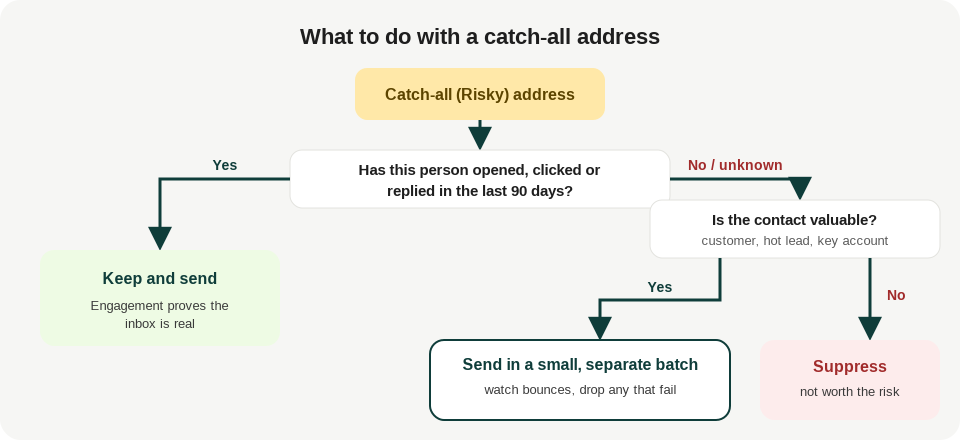
- Keep anyone who engaged recently. If they opened, clicked or replied in the last 90 days, the mailbox is real. Send as normal.
- Check the address pattern. If the company's confirmed addresses look like
firstname.lastname@and this one matches a real person's name, it is more likely to be genuine thaninfo2@or a random string. - Test valuable contacts in a small batch. Customers, warm leads and key accounts are worth a careful test. Send them a separate, small campaign, then remove any that bounce.
- Suppress the rest. Cold, never-engaged catch-all contacts on a purchased or very old list carry most of the risk and little of the value.
- Never mix them into a big send blindly. Keep catch-all contacts in their own segment so a bad result can't drag down your whole campaign.
Catch-all and cold outreach
B2B prospecting lists often contain many catch-all domains, because smaller companies commonly accept all mail at their domain. If you send cold email, keep daily volumes modest, send from a properly authenticated domain (SPF, DKIM and DMARC), and stop mailing any address that bounces once. A clean, partly-smaller list will get you further than a big list that damages your domain.
Check your list for catch-all domains
Start by removing what is definitely broken: typos, dead domains, disposable inboxes and duplicates. Then segment what's left by result. The bulk email verifier takes a CSV and returns a result for every row, so you can filter Risky contacts into their own segment before you send. For the full process, see how to clean your email list.
Frequently asked questions
What does catch-all mean in email verification?
It means the domain's mail server accepts messages for any address, including ones that don't exist. The verifier got a "250 OK" but can't tell if the specific mailbox is real, so the result is Risky or Unknown rather than Valid.
Are catch-all emails safe to send to?
Some are, some aren't. Many belong to real people at companies, but some will bounce after delivery or go to an unread inbox. Send to engaged or high-value catch-all contacts in small batches and watch your bounce rate.
Is a catch-all email address invalid?
No. Catch-all is not the same as invalid. The domain is real and receives mail. The uncertainty is only about whether that particular mailbox exists or is read.
How can I verify a catch-all email address?
No SMTP check can confirm it, because the server accepts everything. Use other signals: whether the person has opened or clicked before, whether the address matches the company's naming pattern, and whether a small test send bounces.
Why do companies use catch-all email?
So that mail sent to misspelled names, old staff addresses or new aliases still reaches someone. It is common on small business domains and some company mail systems.
Sources
Check an email address now
Free: format, typos, disposable and mail server checks. No sign-up, no card.